[1] "tinytex" "kableExtra" "tidyverse" "lubridate" "forcats"
[6] "haven" "labelled" "ggmap" "ggrepel" "ggridges"
[11] "ggthemes" "ggpubr" "GGally" "COVID19" "maps"
[16] "mapdata" "DT"
Data Visualization
Updated Dec 4, 2025
Comments to lab 1 posted here
No Paul next week
No office hours (Thursdays from 1-3 pm) next week


This week we’ll use the following libraries.
[1] "tinytex" "kableExtra" "tidyverse" "lubridate" "forcats"
[6] "haven" "labelled" "ggmap" "ggrepel" "ggridges"
[11] "ggthemes" "ggpubr" "GGally" "COVID19" "maps"
[16] "mapdata" "DT"
Next we’ll create a function called ipak (thanks Steven) which:
pkg)Again, run this code on your machines
Finally, let’s use ipak to install and load the_packages
What should we replace some_function and some_input with to do this?
tinytex kableExtra tidyverse lubridate forcats haven labelled
TRUE TRUE TRUE TRUE TRUE TRUE TRUE
ggmap ggrepel ggridges ggthemes ggpubr GGally COVID19
TRUE TRUE TRUE TRUE TRUE TRUE TRUE
maps mapdata DT
TRUE TRUE TRUE
R may ask you to install a package’s dependencies (other packages your package needs). Try entering the number 1 into your consoleR may tell you need to restart R Try saying yes. If it doesn’t start downloading, say noR may then ask if you want to compile some packages from source. Type Y into your console. If this doesn’t work, try again, but this time type N when askedLet’s load the Covid-19 data we worked with last week:
Unmatched parentheses or brackets
Misspelled a name
Forgot a comma
Forgot to install a package or load a library
Forgot to set the working directory/path to a file you want R to use.
Tried to select a column or row that doesn’t exist
Code chunks out of order
R Studio’s script editor will show a red circle with a white x in next to a line of code it thinks has an error in it.
Have someone else look at your code (Fresh eyes, paired programming)
Copy and paste the “general part” of error message into Google/ChatGPT/your preferred AI overlord
Knit your document after each completed code chunk
Be patient. Don’t be hard are yourself. Remember, errors are portals of discovery.
package_name::function_name()conflicted package (with care)Rarely, if ever, do we get data in the exact format we need.
Instead, before we can get to work, we often need to transform our data in various ways
Sometimes called:
The end goal is the same: make messy data tidy
Every column is a variable.
Every row is an observation.
Every cell is a single value
Last week we used the following functions:
read_csv() and data() to read and load data in R
logical operators like &, |, %in% ==, !=, >,>=,<,<= to make comparisons
the pipe command %>% to “pipe” the output of one function into another
filter() to pick observations (rows) by their values
arrange() to reorder rows
select() to pick variables by their names
mutate() and case_when() command to create new variables in our data set
summarise() to collapse many values into a single value (like a mean or median)
group_by() to apply functions like mutate() and summarise() on a group-by-group basis
All of these “verb” functions from the dplyr package (e.g. filter(),mutate()) follow a similar format:
%>%?%>%The pipe command is way of “chaining” lines of code together, piping the results of one tidyverse function into the next function.
The pipe command works because these functions always expect a data frame as their first argument, and always produce a data frame as their output.
%>%To work with the Covid-19 data we did the following:
Specifically, we did the following:
territories that is a vector containing the names of U.S. territoriescovid_us, by filtering out observations from the U.S. territoriesstate variable that is a copy of the administrative_area_level_2new_cases from the confirmed. Create a variable called new_cases_pc that is the number of new Covid-19 cases per 100,000 citizensface_masks from the facial_coverings variable.face_masksLet’s take some time to make sure we understand everything that was happening.
territoriesterritories now exists in our environment.covid_usfilter() command to select only the rows where the administrative_area_level_2 is not (!) in (%in%) the territories objectstateCopy administrative_area_level_2 into a new variable called state
Note
Note that we have to save the output of mutate back into covid_us for our state to exist as new column in covid_us
stateNow there’s a new column in covid_us called state, that we can access by calling covid_us$state
[1] "Minnesota" "Minnesota" "Minnesota" "Minnesota" "Minnesota"
We could have done the same thing in “Base” R
Why didn’t we?
tidyverse > base Rmutate() plays nicely with functions like group_by()new_cases from the confirmed variableThe confirmed variable contains a running total of confirmed cases in a given state on a given day.
Visualizing data helps us understand how we might need to transform our data
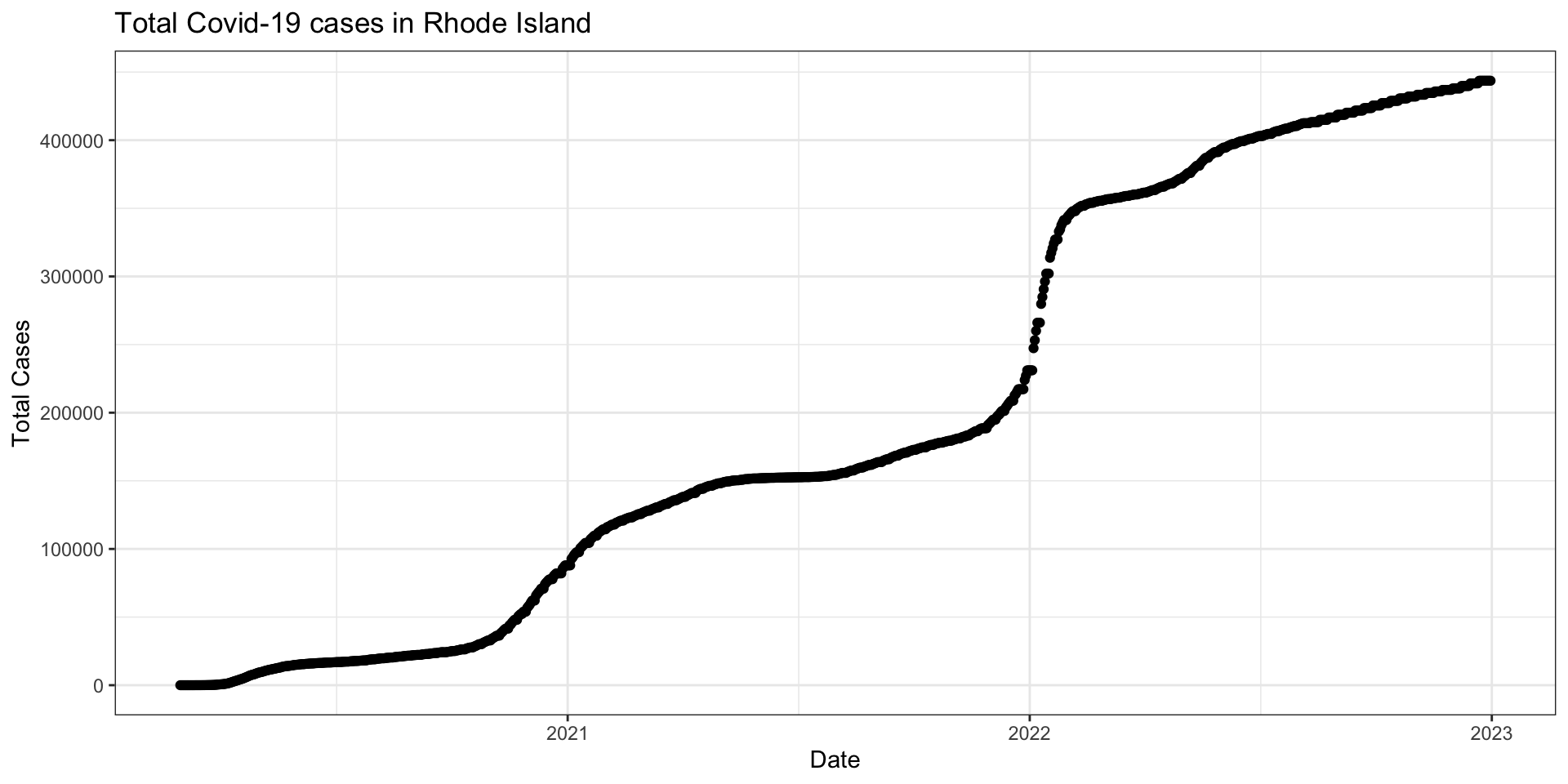
confirmed variable for Rhode Islandnew_cases from the confirmed variableTake the difference between a given day’s value of confirmed and yesterday’s value of confirmed to create a measure of new_cases on a given date for each state
Note
lag() to shift values in a column down one row in the datagroup_by() to respect the state-date structure of the datanew_cases_pcnew_cases by population to create a per capita measure (new_cases_pc)Note
We can create multiple variables in a single mutate() by separating lines of code with a ,
# Check recoding
covid_us %>%
# Look at two states
filter(state == "Rhode Island" | state == "New York") %>%
# In a small date range
filter(date > "2021-01-01" & date < "2021-01-05") %>%
# Select only the columns we want
select(state, date, population, new_cases, new_cases_pc) -> hlo_df
# save to object hlo_df# A tibble: 6 × 5
# Groups: state [2]
state date population new_cases new_cases_pc
<chr> <date> <int> <int> <dbl>
1 Rhode Island 2021-01-02 1059361 0 0
2 Rhode Island 2021-01-03 1059361 0 0
3 Rhode Island 2021-01-04 1059361 4759 449.
4 New York 2021-01-02 19453561 15849 81.5
5 New York 2021-01-03 19453561 12232 62.9
6 New York 2021-01-04 19453561 11242 57.8
face_masksCreate a variable called face_masks from the facial_coverings that describes the face mask policy experienced by most people in a given state on a given date.
Note
case_when() inside of mutate() to create a variable that takes certain values when certain logical statements are truelevels = c(value1, value2, etc.) argument in factor() lets us control the ordering of categorical/character data.Recall, that the facial_coverings variable took on range of substantive values from 0 to 4, but empirically could take both positve and negative values
covid_us %>%
mutate(
face_masks = case_when(
facial_coverings == 0 ~ "No policy",
abs(facial_coverings) == 1 ~ "Recommended",
abs(facial_coverings) == 2 ~ "Some requirements",
abs(facial_coverings) == 3 ~ "Required shared places",
abs(facial_coverings) == 4 ~ "Required all times",
) %>% factor(.,
levels = c("No policy","Recommended",
"Some requirements",
"Required shared places",
"Required all times")
)
) -> covid_us# A tibble: 5 × 4
# Groups: state [1]
state date facial_coverings face_masks
<chr> <date> <int> <fct>
1 Illinois 2020-09-29 2 Some requirements
2 Illinois 2020-09-30 2 Some requirements
3 Illinois 2020-10-01 -4 Required all times
4 Illinois 2020-10-02 -4 Required all times
5 Illinois 2020-10-03 -4 Required all times
In last week’s lab, we also added the following
R treat’s dates differently
If R knows a variable is a date, we can extract components of that date, using functions from the lubridate package
str_pad() and paste() functionstr_pad() function lets us ‘pad’ strings so that they’re all the same character width[1] 1 1 1
[1] "01" "01" "01"
paste function lets us paste character strings together.new_cases by face_mask policyCalculate the mean (average) number of new_cases of Covid-19 when each type of face_mask policy was in effect
Note
group_by() command will do each calculation inside of summarise() for each level of the grouping variablenew_cases by face_mask policy by month and yearCalculate the mean (average) number of new_cases of Covid-19 when each type of face_mask policy was in effect for each year_month in our dataset
Note
group_by() command can group on multiple variables# A tibble: 102 × 3
# Groups: face_masks [5]
face_masks year_month new_cases_pc
<fct> <chr> <dbl>
1 No policy 2020-01 0.000463
2 No policy 2020-02 0.00188
3 No policy 2020-03 1.70
4 No policy 2020-04 6.50
5 No policy 2022-04 19.8
6 No policy 2022-05 20.4
7 No policy 2022-06 37.6
8 No policy 2022-07 36.2
9 No policy 2022-08 35.7
10 No policy 2022-09 19.0
# ℹ 92 more rows
[1] 0.0004626161
Suppose you want to do the following, what function or functions would you use:
RSuppose you want to do the following, what function or functions would you use:
R
read_xxx() (tidy), read.xxx() (base)head(), tail(), glimpse(), table(), summary(), View()data %>% filter(x > 0), data[data$x > 0], subset(data, x > 0)data$variable, data %>% select(variable1, variable2), data[,c("x1","x2")]data %>% mutate(x = y/10) data$x <- data$y/10data %>% summarise(x_mn = mean(x, na.rm=T))data %>% group_by(g) %>% summarise(x_mn = mean(x, na.rm=T))Should you know exactly how to do all of this?
NO! Of course not. For Pete’s sake, Paul, It’s only the second week
Will you learn how to do much of this?
Maybe, but I’m feeling pretty overwhelmed…
How will you learn how do these things?
With lots of practice, patience, and repetition motivated by a sense that these skills will help me learn about things I care about
When social scientists talk about descriptive inference, we’re trying to summarize our data and make claims about what’s typical of our data
Here are some common ways of summarizing data and how to calculate them with R
| Description | Usage |
|---|---|
| sum | sum(x) |
| minimum | min(x) |
| maximum | max(x) |
| range | range(x) |
| mean | mean(x) |
| median | median(x) |
| percentile | quantile(x) |
| variance | var(x) |
| standard deviation | sd(x) |
| rank | rank(x) |
All of these functions have an argument called na.rm=F. If your data have missing values, you’ll need to set na.rm=F (e.g. mean(x, na.rm=T))
Measures of typical values
Means (mean()) all the time
Medians (median()) useful for describing distributions of variables particularly those with extreme values
Mode useful for characterizing categorical data
Measures of typical variation
var() important for quantifying uncertainty, but rarely will you be calculating this directly
sd() a good summary of a typical change in the data. Often used to rescale data and for statistical inference
range(), min(), max() useful for exploring data, detecting outliers and potential values that need to be recoded
Measures of association
Covariance (var()) central to describing relationships but generally not something you’ll calculate or interpret directly
Correlation (cor()) useful for describing [bivariate] relationships (positive or negative relationships).
We won’t spend much time on the formal definitions, math, and proofs
\[ \bar{x}=\frac{1}{n}\sum_{i=1}^n x_i \]
\[ M_x = X_i : \int_{-\infty}^{x_i} f_x(X)dx=\int_{x_i}^\infty f_x(X)dx=1/2 \]
Useful eventually. Not necessary right now.
Data visualization is an incredibly valuable tool that helps us to
Take a look at how the BBC uses R to produce its graphics
Today, we will:
grammar of graphicsggplot()Inspired by Wilkinson (2005)
A statistical graphic is a mapping of
datavariables toaesthetic attributes ofgeometric objects.
At a minimum, a graphic contains three core components:
data: the dataset containing the variables of interest.aes: aesthetic attributes of the geometric object. For example, x/y position, color, shape, and size. Aesthetic attributes are mapped to variables in the dataset.geom: the geometric object in question. This refers to the type of object we can observe in a plot For example: points, lines, and bars.In R, we’ll implement this grammar of graphics using the ggplot package
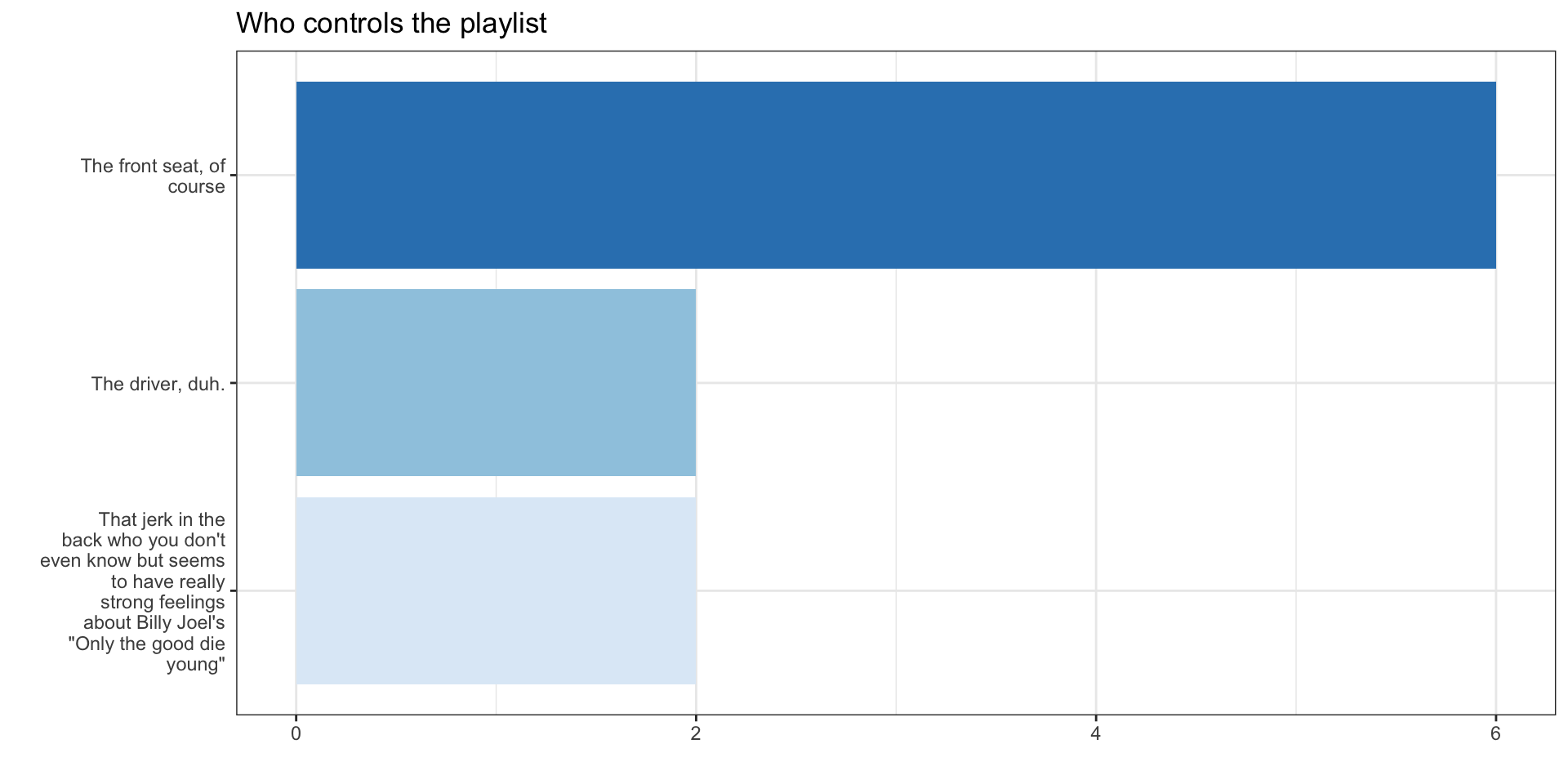
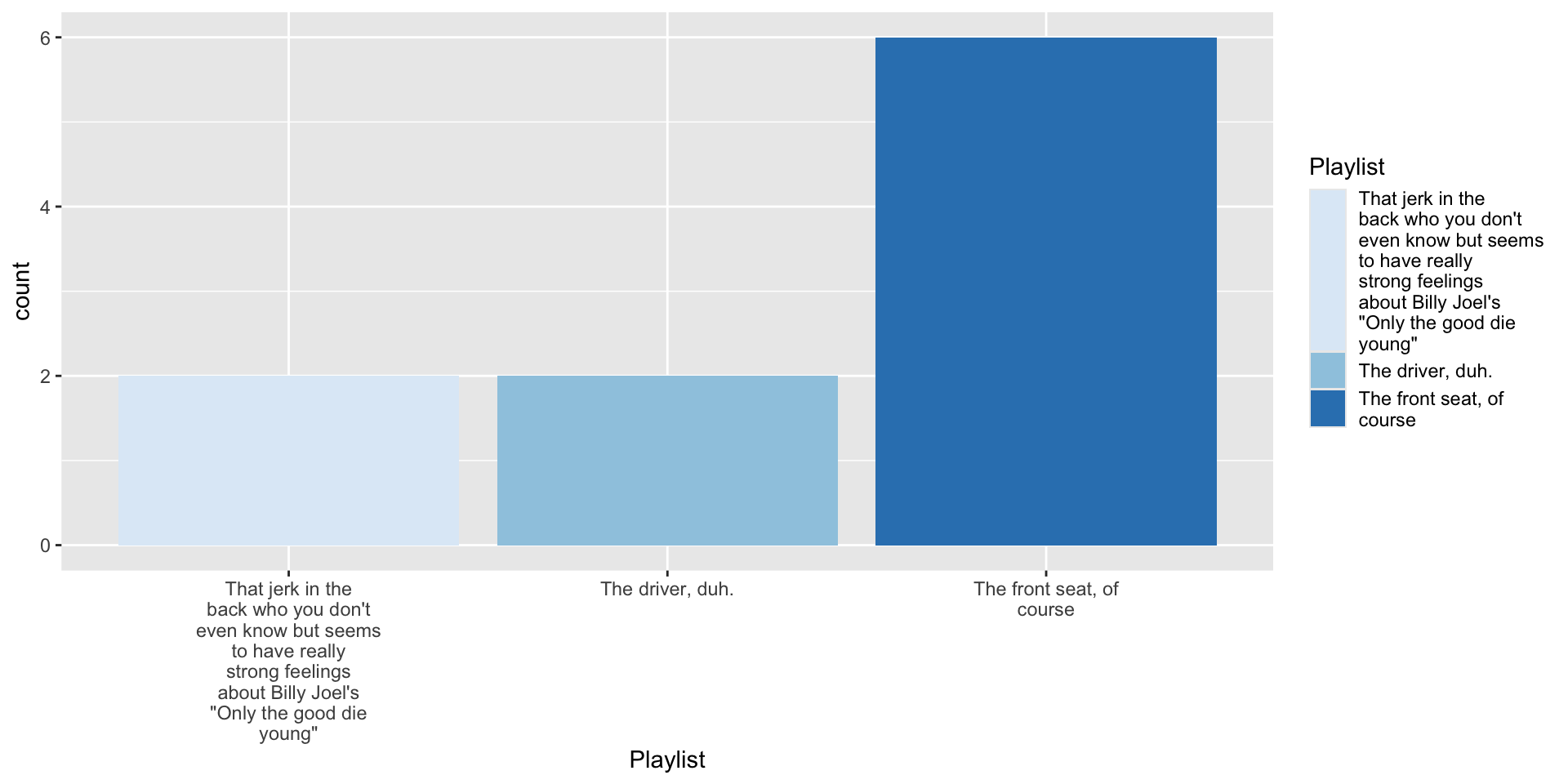
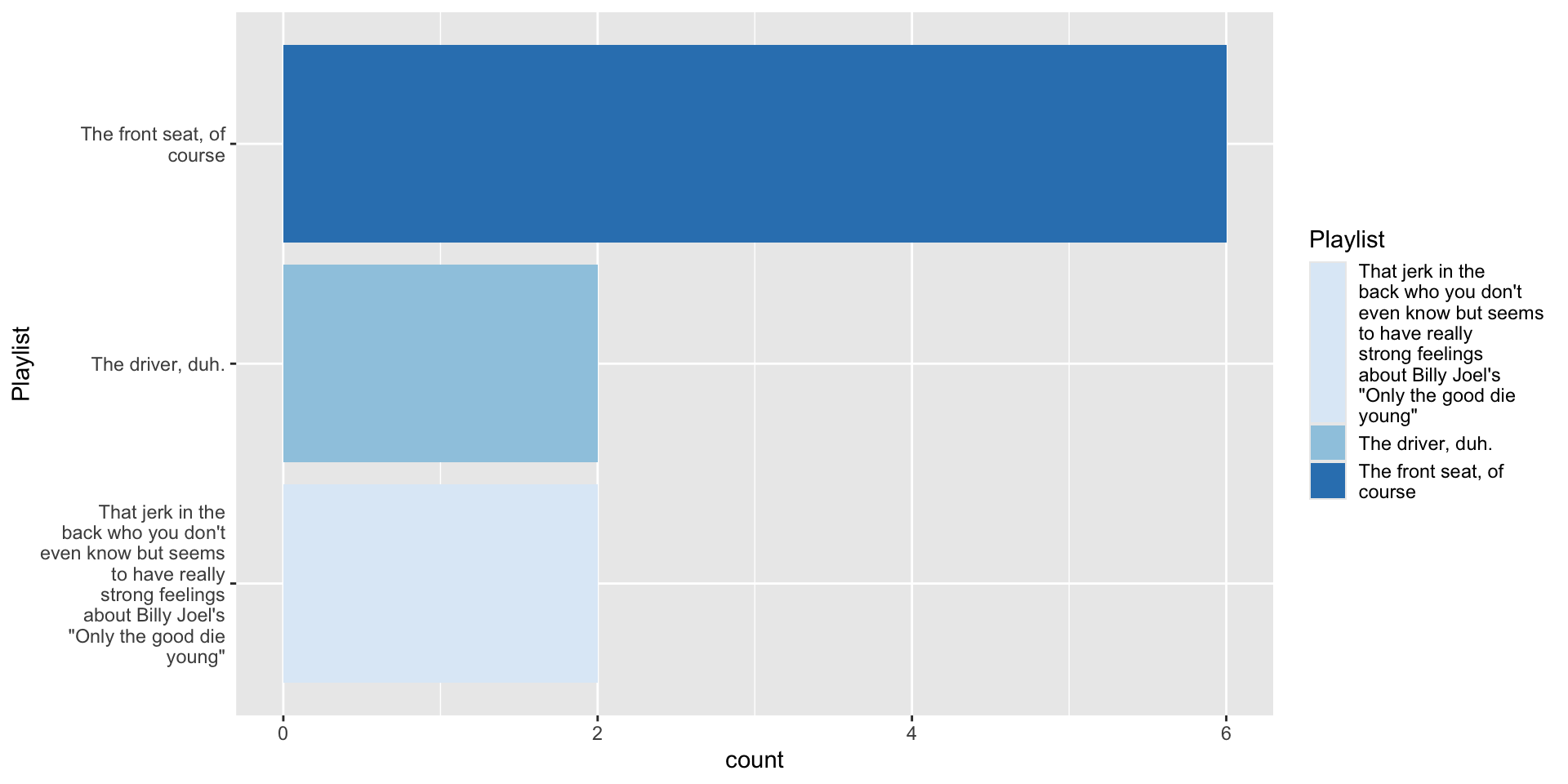
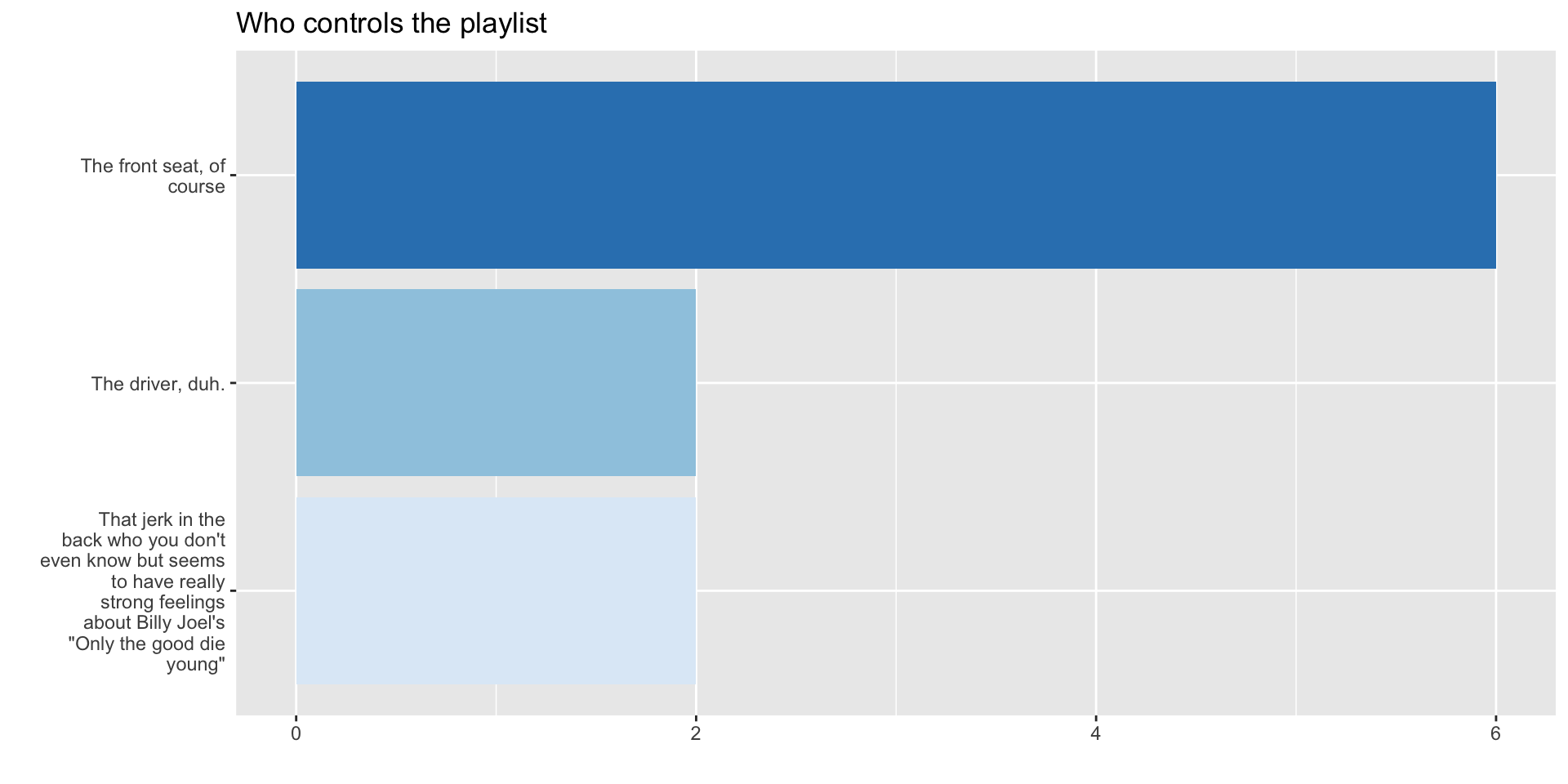
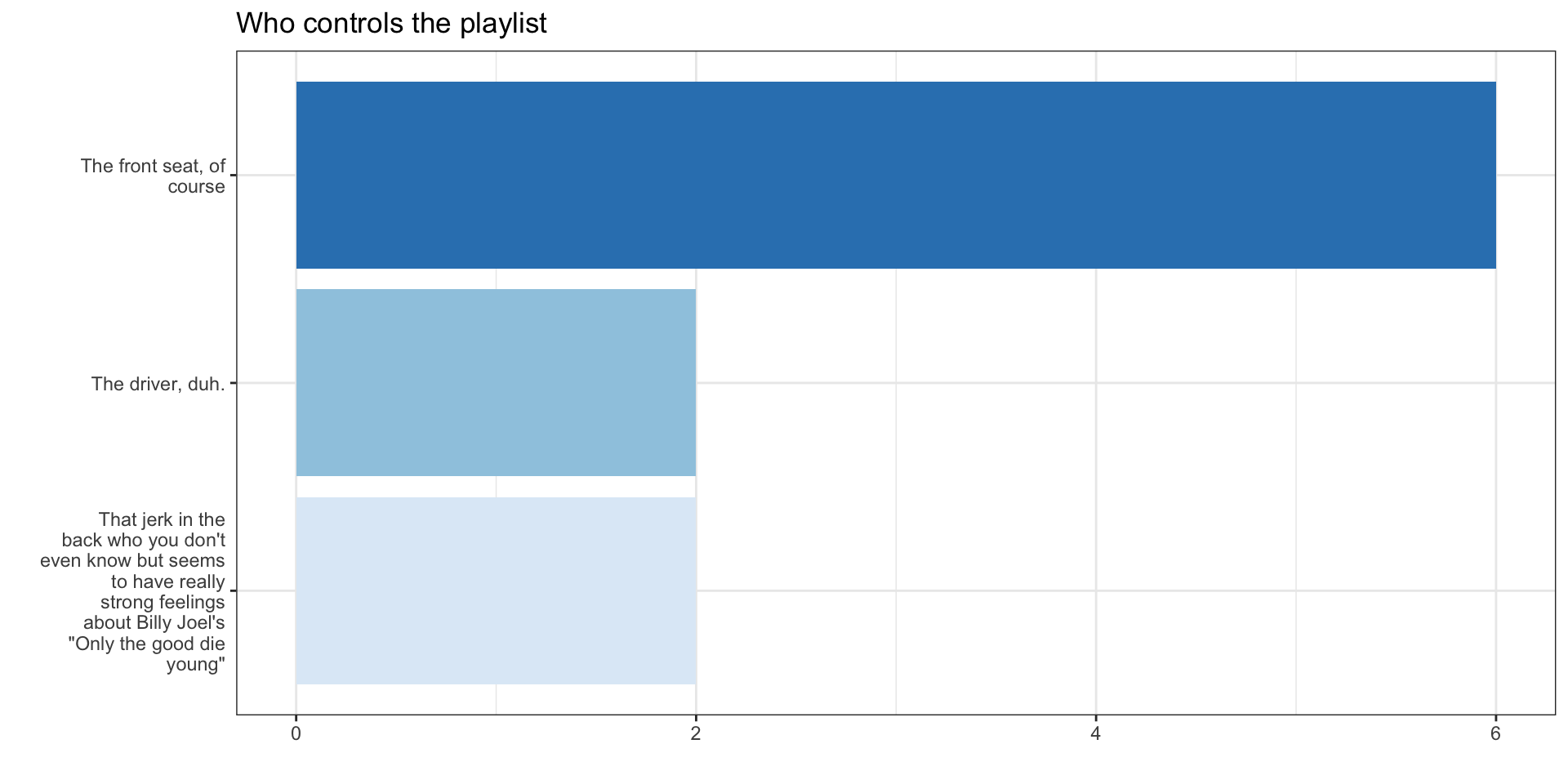
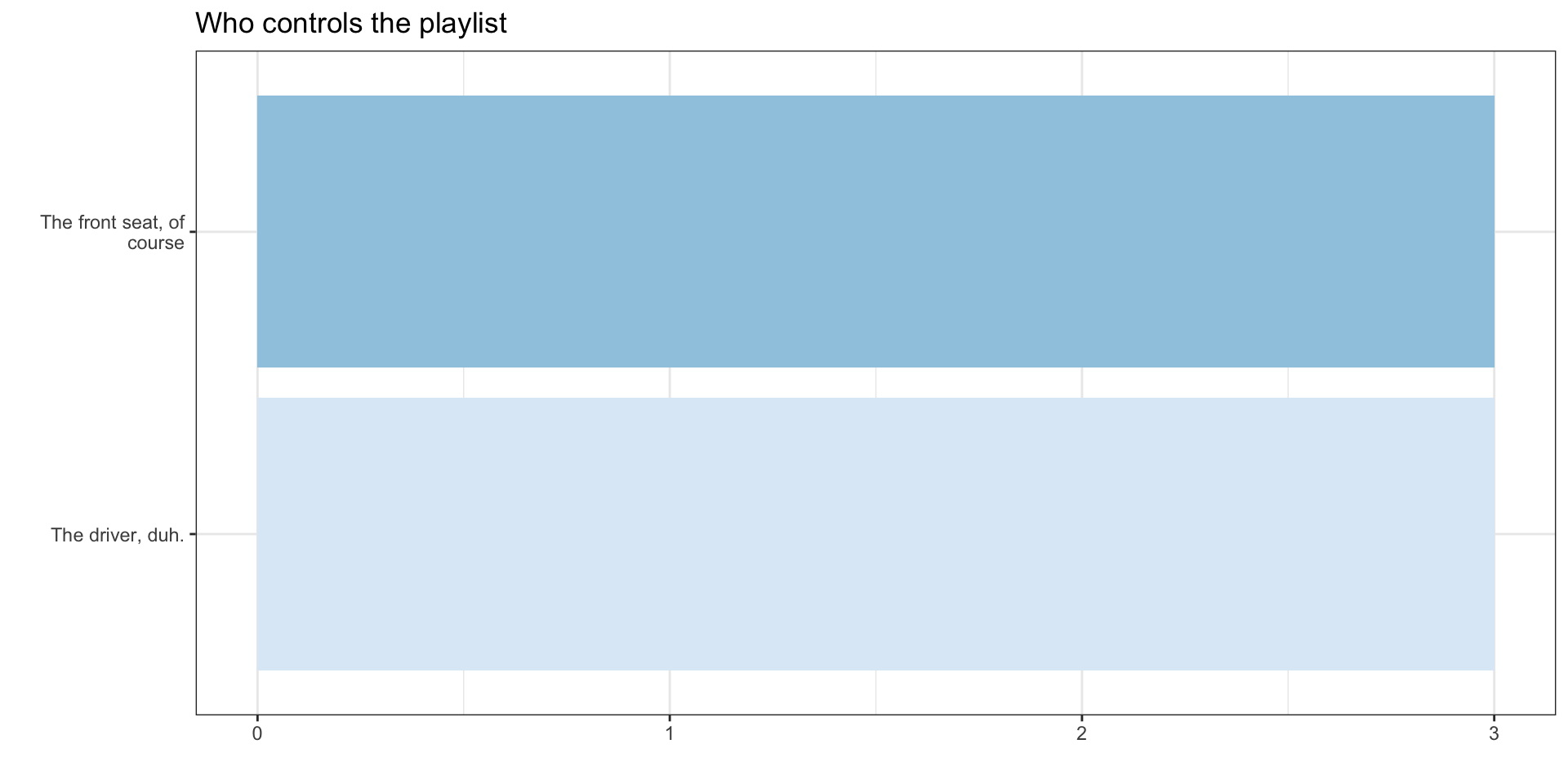
data, aesthetics, geometries, and statistics I want it to plot<labelled<double>[12]>: You're on a road trip with friends. Who controls the music?
[1] NA 3 1 2 3 2 2 2 1 2 2 NA
Labels:
value
1
2
3
label
The driver, duh.
The front seat, of course
That jerk in the back who you don't even know but seems to have really strong feelings about Billy Joel's "Only the good die young"
# A tibble: 12 × 1
Playist
<fct>
1 <NA>
2 "That jerk in the back who you don't even know but seems to have really stro…
3 "The driver, duh."
4 "The front seat, of course"
5 "That jerk in the back who you don't even know but seems to have really stro…
6 "The front seat, of course"
7 "The front seat, of course"
8 "The front seat, of course"
9 "The driver, duh."
10 "The front seat, of course"
11 "The front seat, of course"
12 <NA>
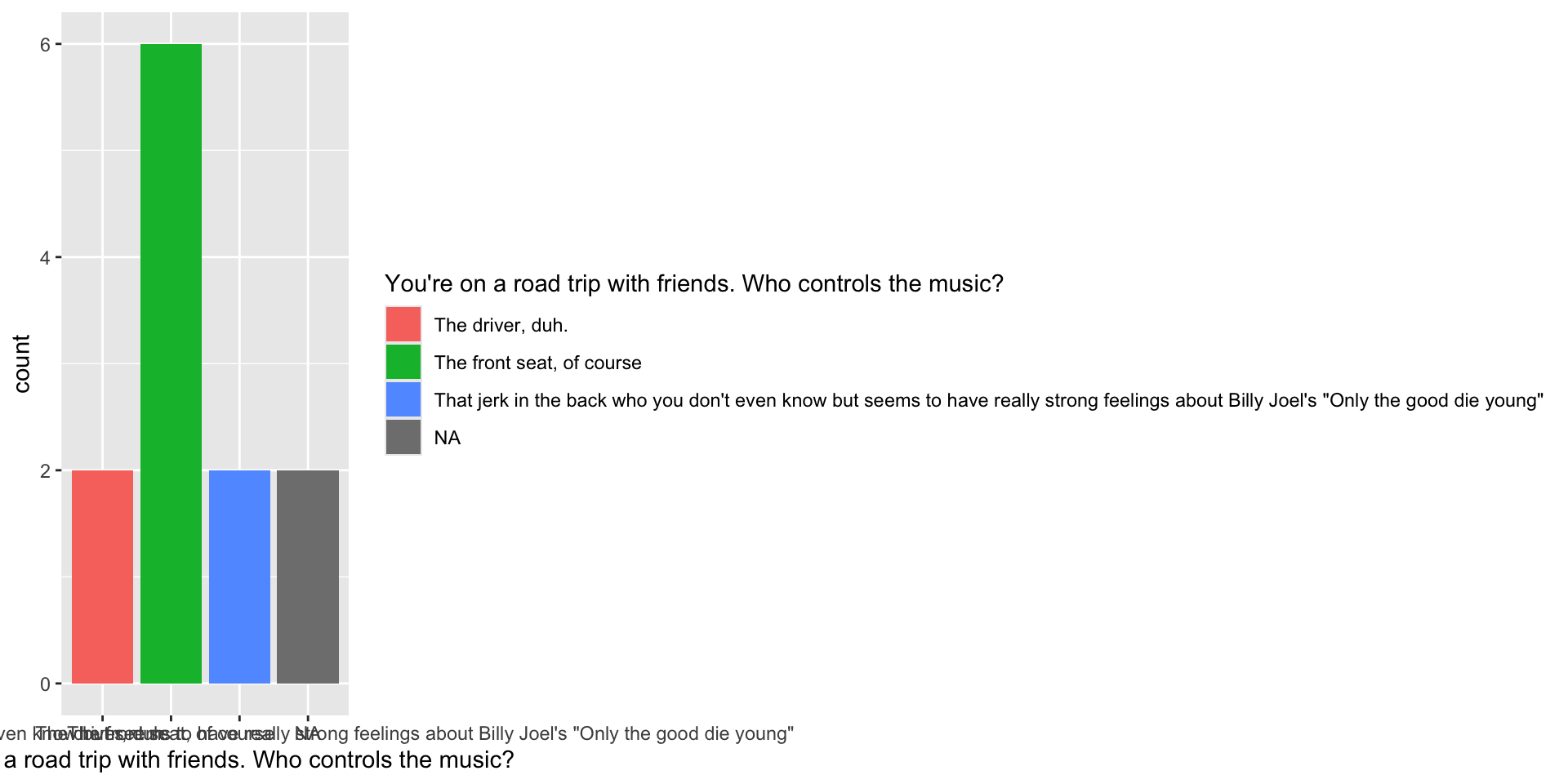
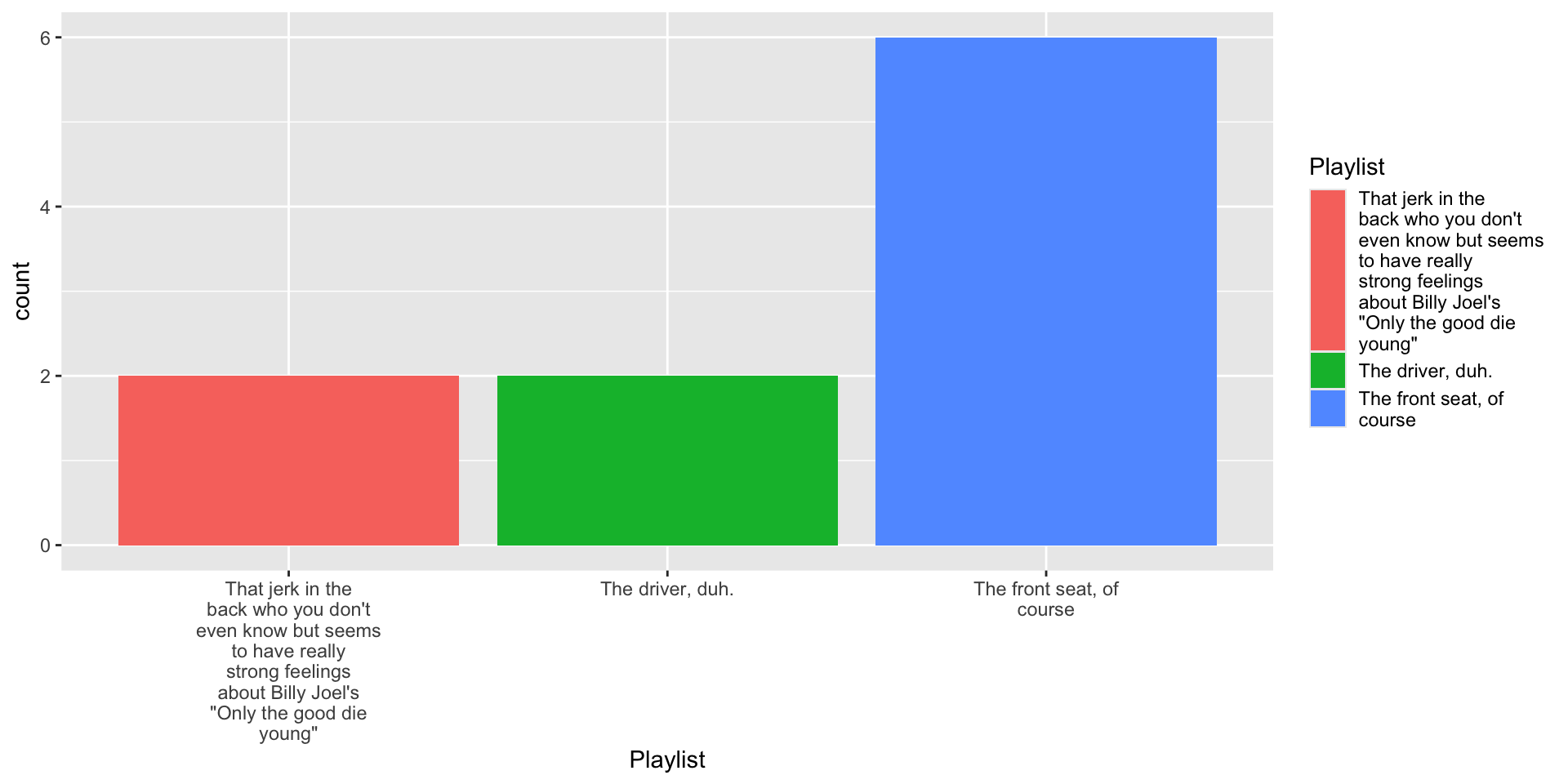
fill aestheticIn the remaining slides, we’ see how to visualize some distributions and associations in the Covid data using:
summarize() and other data wrangling skills to transform data for plottingfactor() and related functions to control order of labels on axisggplotWhat was the most common face mask policy in the data?
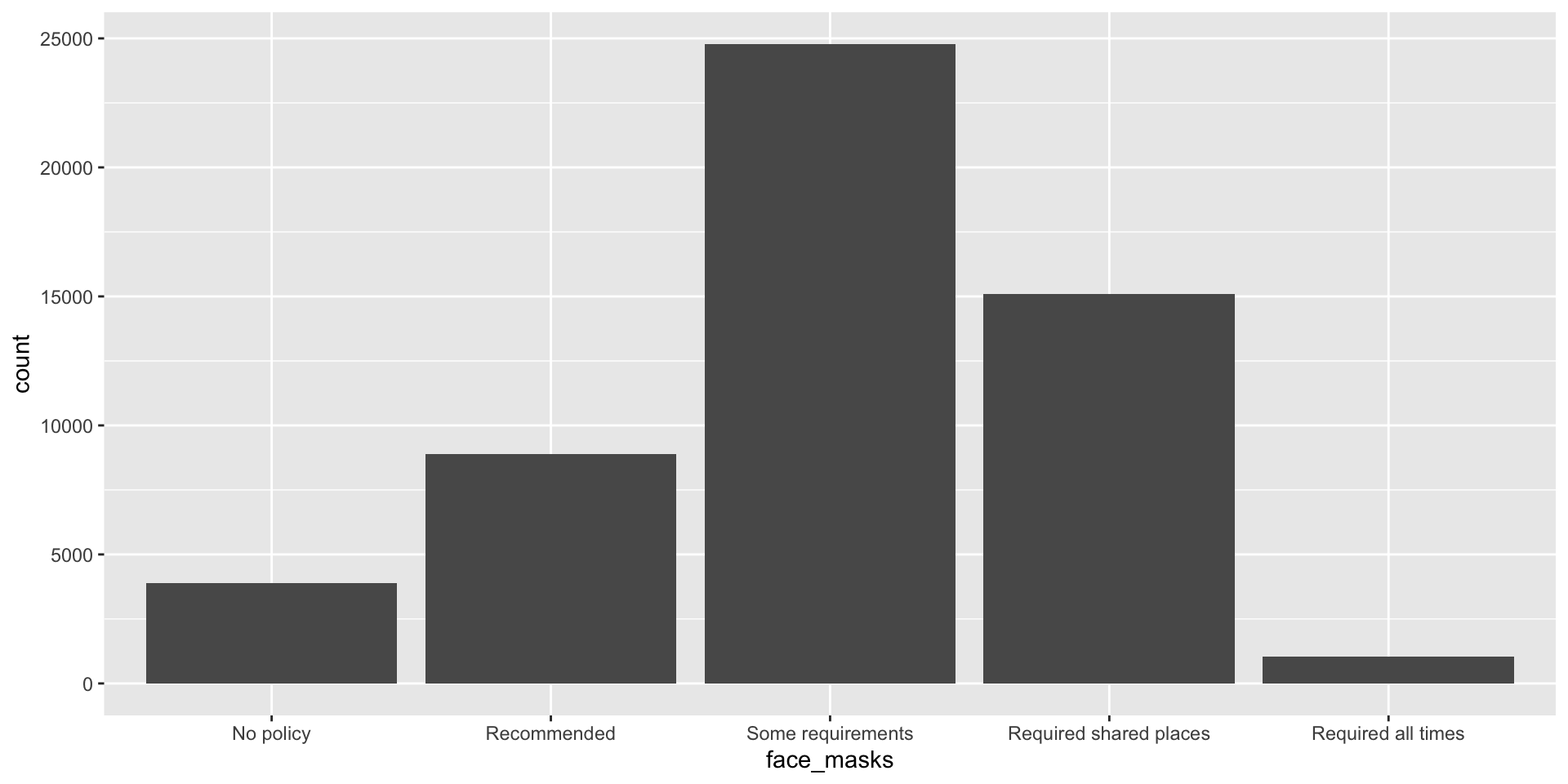
covid_us %>%
ungroup() %>%
mutate(
face_masks = forcats::fct_infreq(face_masks)
) %>%
ggplot(aes(x=face_masks,
fill = face_masks))+
geom_bar()+
geom_text(stat='count', aes(label=..count..),
hjust=.5,vjust=-.5)+
guides(fill = "none")+
theme_bw()+
labs(
x = "Face Mask Policy ",
title = ""
) -> fig_barplot
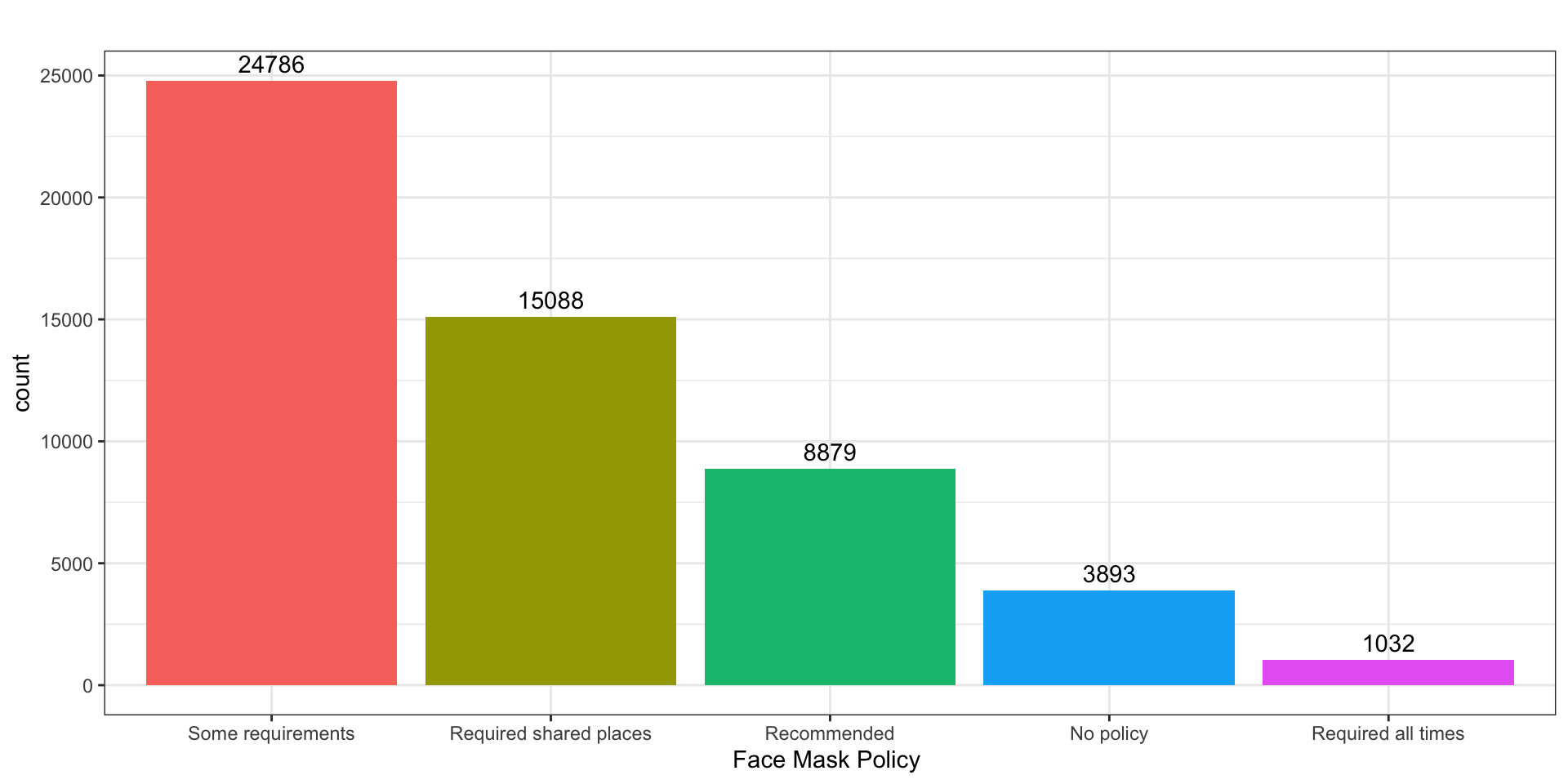
What does the distribution of new Covid-19 cases look like in June 2021
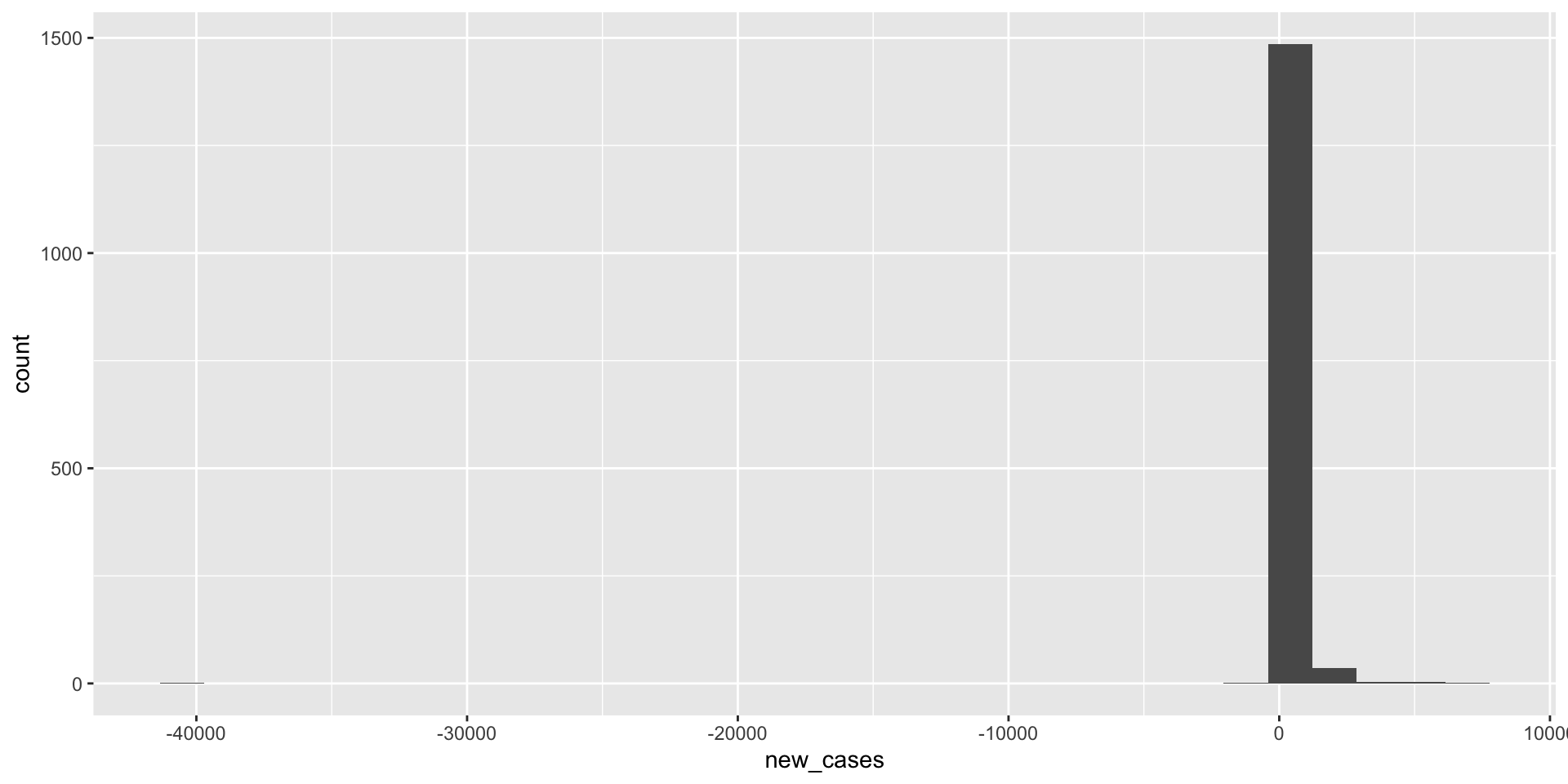
covid_us %>%
filter(year_month == "2021-06") %>%
filter(new_cases > 0) %>%
ggplot(aes(x=new_cases))+
geom_histogram() +
labs(
title = "Exclude Negative Values"
) -> fig_hist2a
covid_us %>%
filter(year_month == "2021-06") %>%
filter(new_cases > 0) %>%
ggplot(aes(x=new_cases))+
geom_histogram() +
scale_x_log10()+
labs(
title = "Exclude Negative Values & Use log scale"
) -> fig_hist2b
fig_hist2 <- ggarrange(fig_hist2a, fig_hist2b)
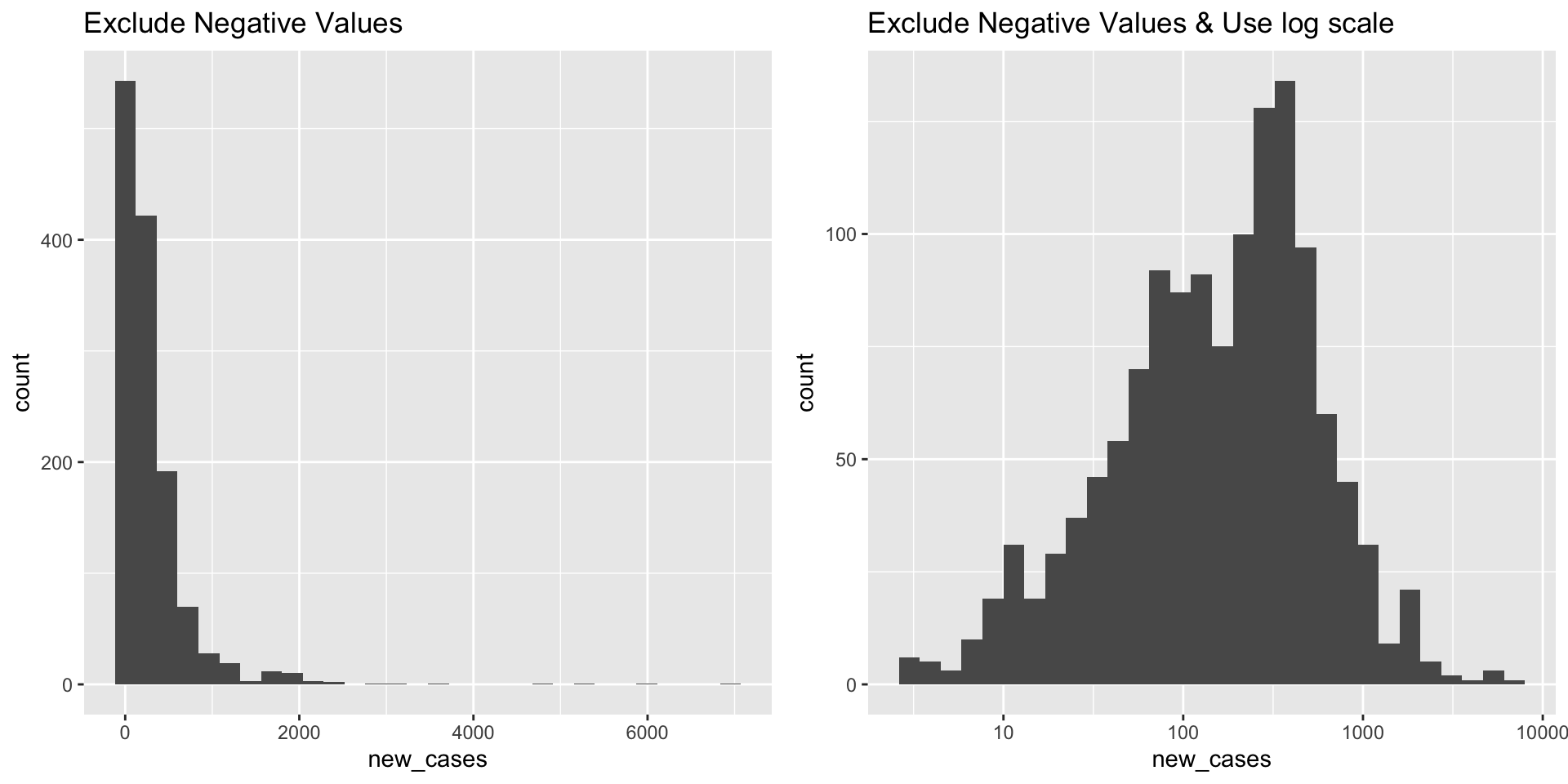
What does the distribution of Covid-19 deaths look like?
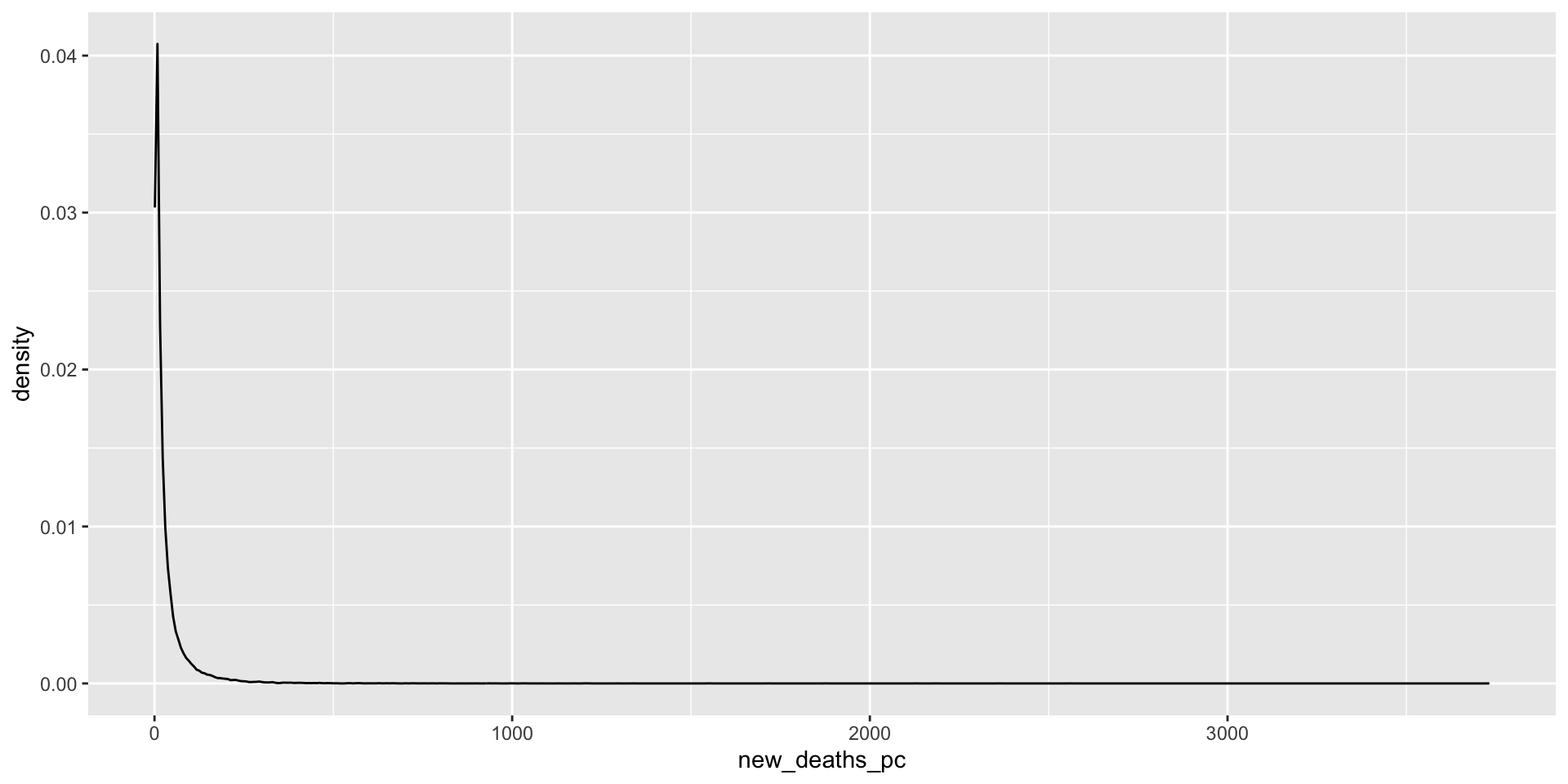
covid_us %>%
mutate(
new_deaths = deaths - lag(deaths),
new_deaths_pc = deaths - lag(deaths),
year_f = factor(year)
) %>%
filter(new_deaths > 0) %>%
ggplot(aes(x=new_deaths_pc,
col = year_f))+
geom_density() +
geom_rug() +
scale_x_log10() +
facet_wrap(~month)+
theme(legend.position = "bottom")->
fig_density2
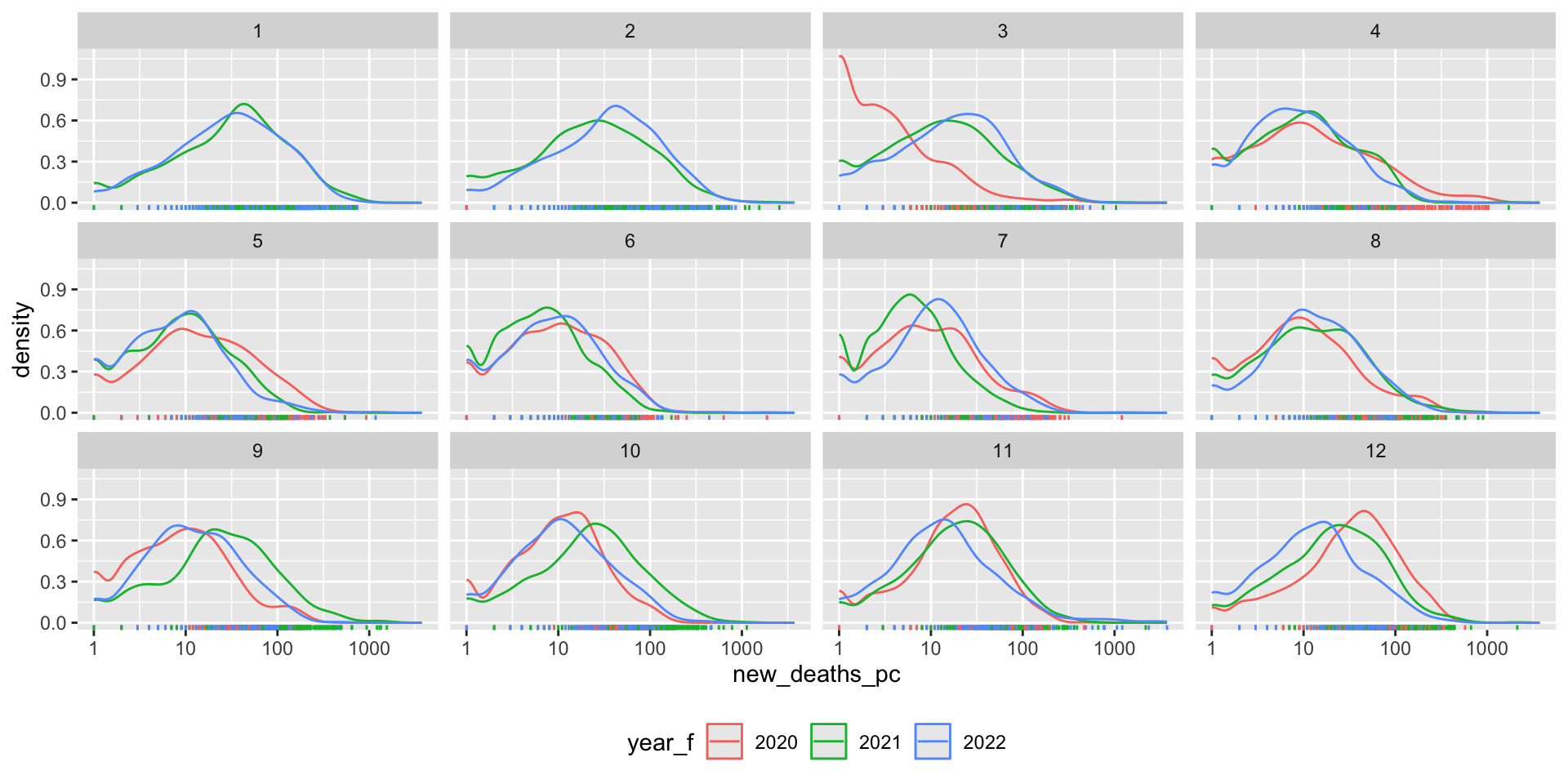
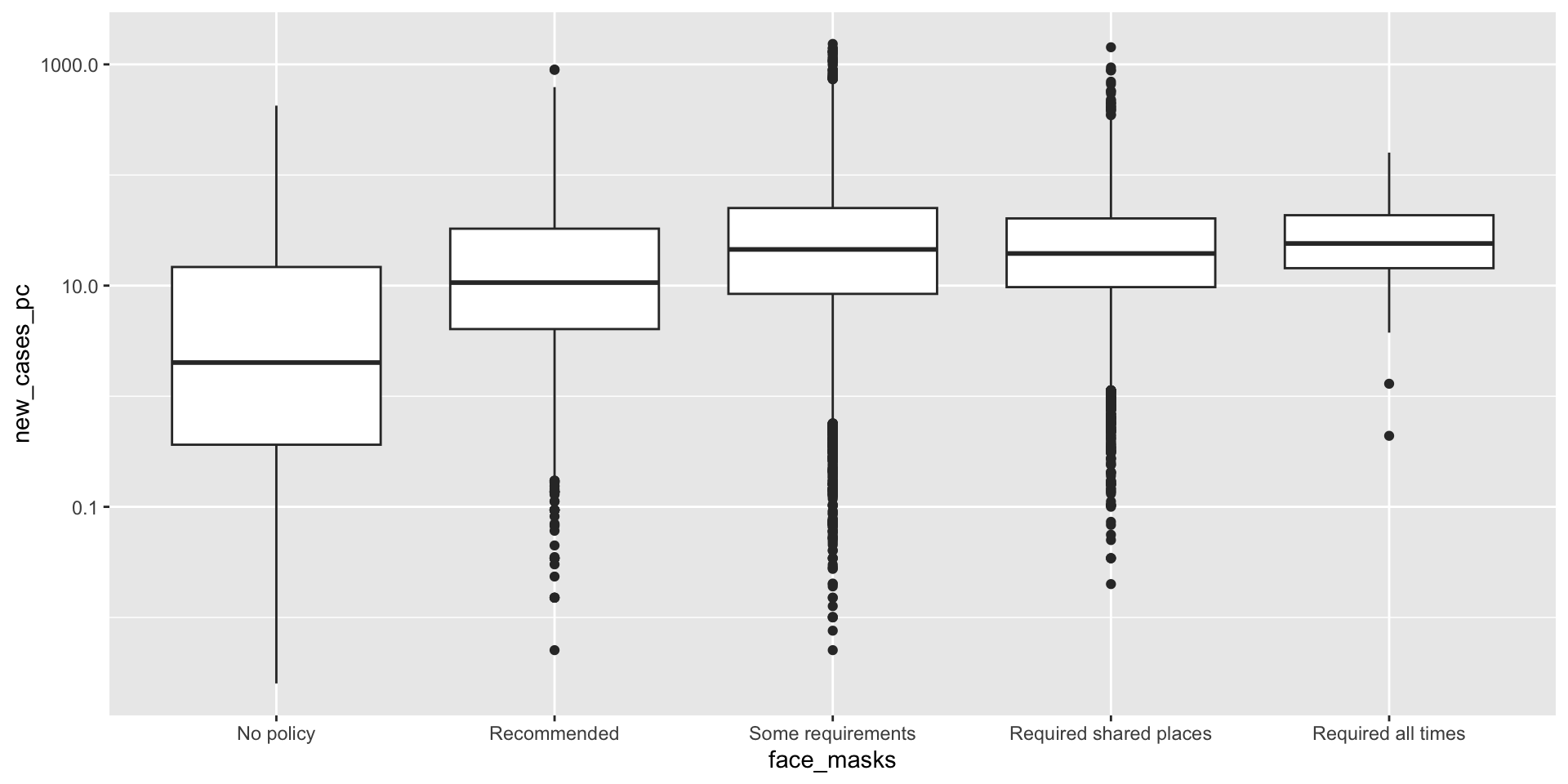
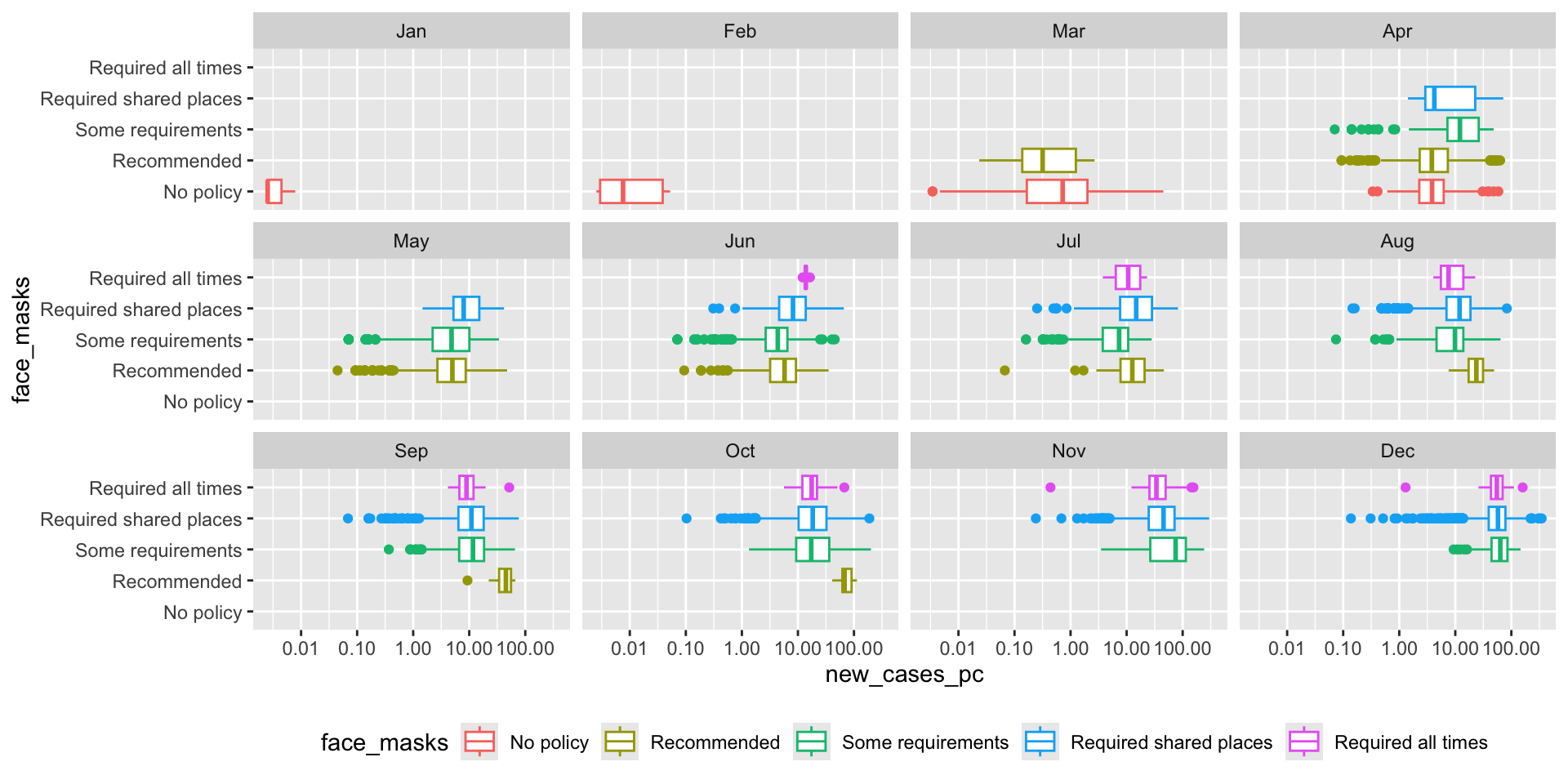
How did the distribution of Covid-19 cases vary by face mask policy?
covid_us %>%
mutate(
Month = lubridate::month(date, label = T)
) %>%
filter(new_cases_pc > 0) %>%
filter(year == 2020) %>%
ggplot(aes(x= face_masks,
y=new_cases_pc,
col = face_masks))+
scale_y_log10()+
coord_flip() +
geom_boxplot() +
facet_wrap(~Month) +
theme(
legend.position = "bottom"
)-> fig_boxplot2
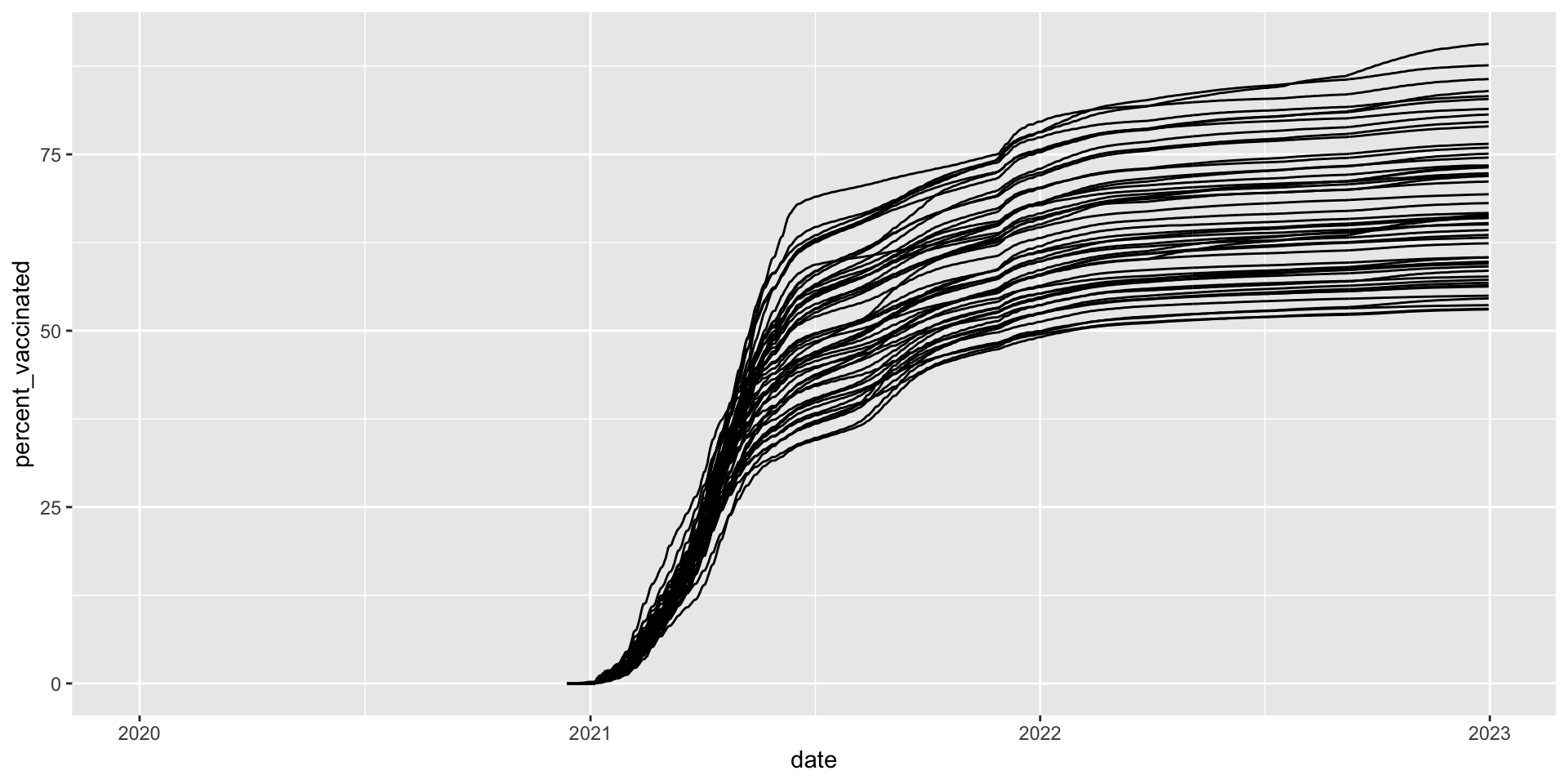
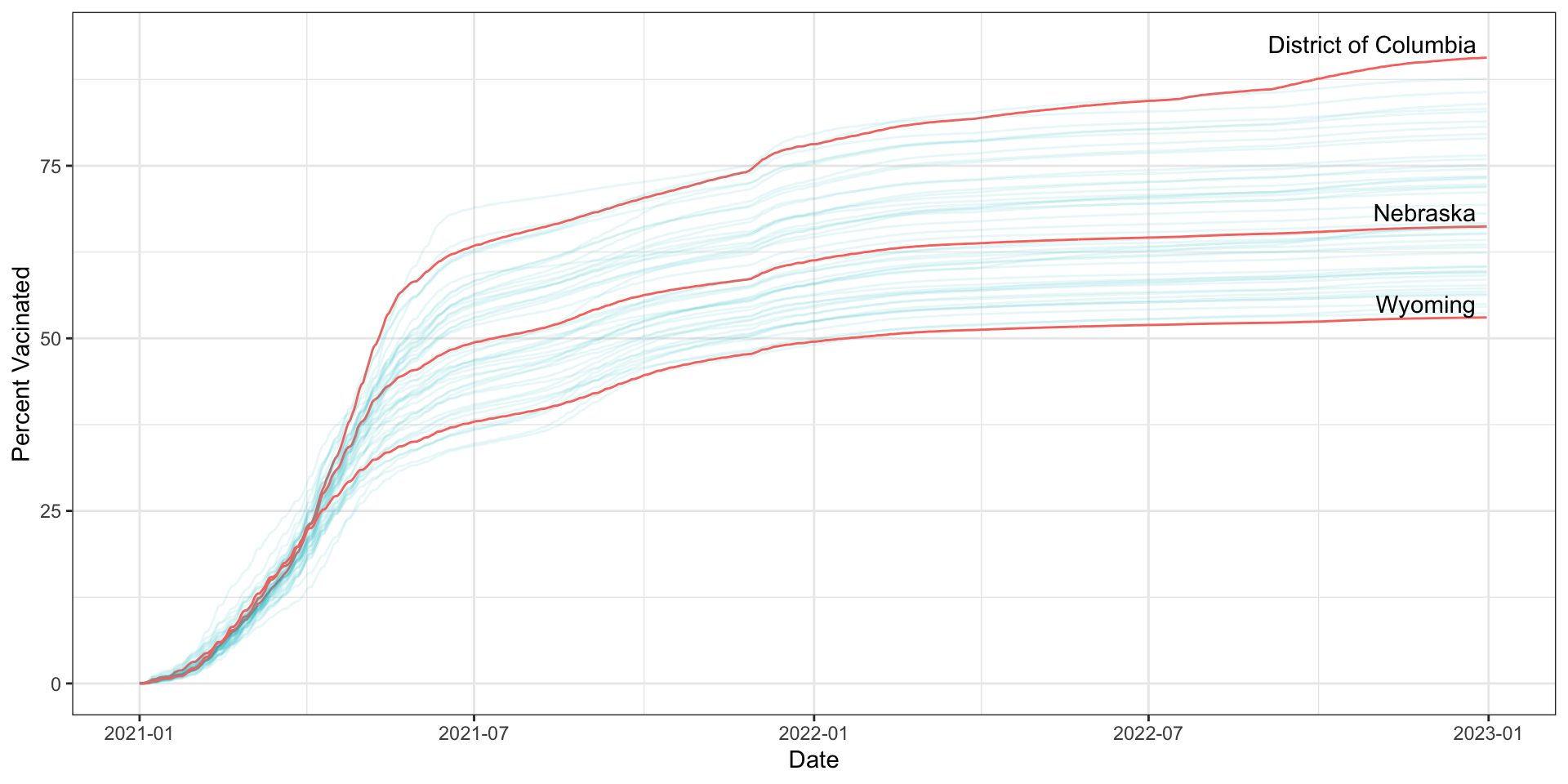
How did vaccination rates vary by state?
covid_us %>%
ungroup() %>%
mutate(
Label = case_when(
date == max(date) & percent_vaccinated == max(percent_vaccinated[date == max(date)], na.rm = T) ~ state,
date == max(date) & percent_vaccinated == median(percent_vaccinated[date == max(date)], na.rm = T) ~ state,
date == max(date) & percent_vaccinated == min(percent_vaccinated[date == max(date)], na.rm = T) ~ state,
TRUE ~ NA_character_
),
line_alpha = case_when(
state %in% c("District of Columbia", "Nebraska", "Wyoming") ~ 1,
T ~ .3
),
line_col = case_when(
state %in% c("District of Columbia", "Nebraska", "Wyoming") ~ "black",
T ~ "grey"
)
) %>%
ggplot(
aes(x= date,
y=percent_vaccinated,
group = state
))+
geom_line(
aes(alpha = line_alpha,
col =line_col)) +
geom_text_repel(aes(label = Label),
direction = "x",
nudge_y = 2) +
guides(
alpha = "none",
col = "none"
)+
xlim(ym("2021-01"), ym("2023-01")) +
labs(
y = "Percent Vacinated",
x = "Date"
) +
theme_bw()-> fig_line2
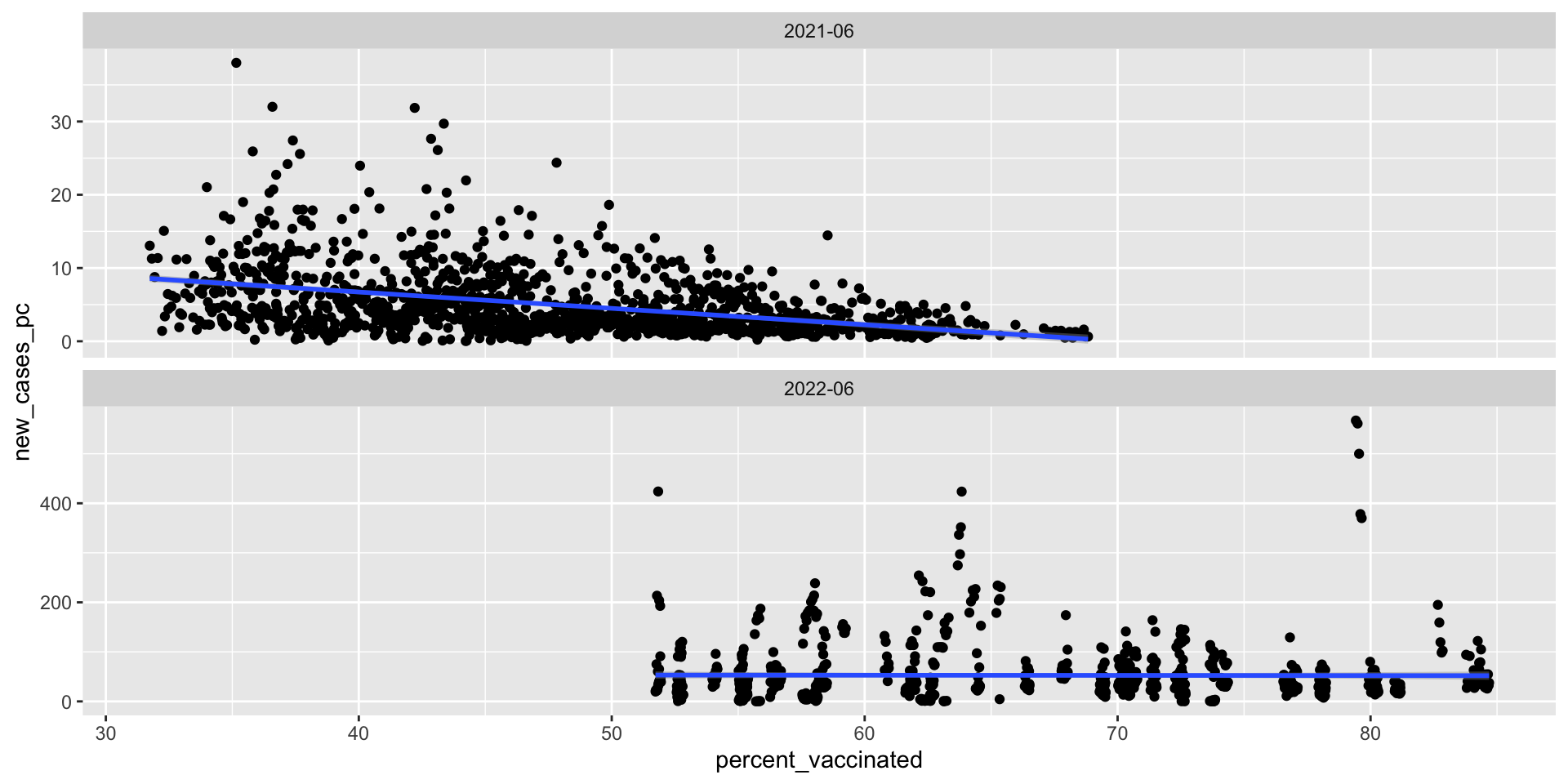
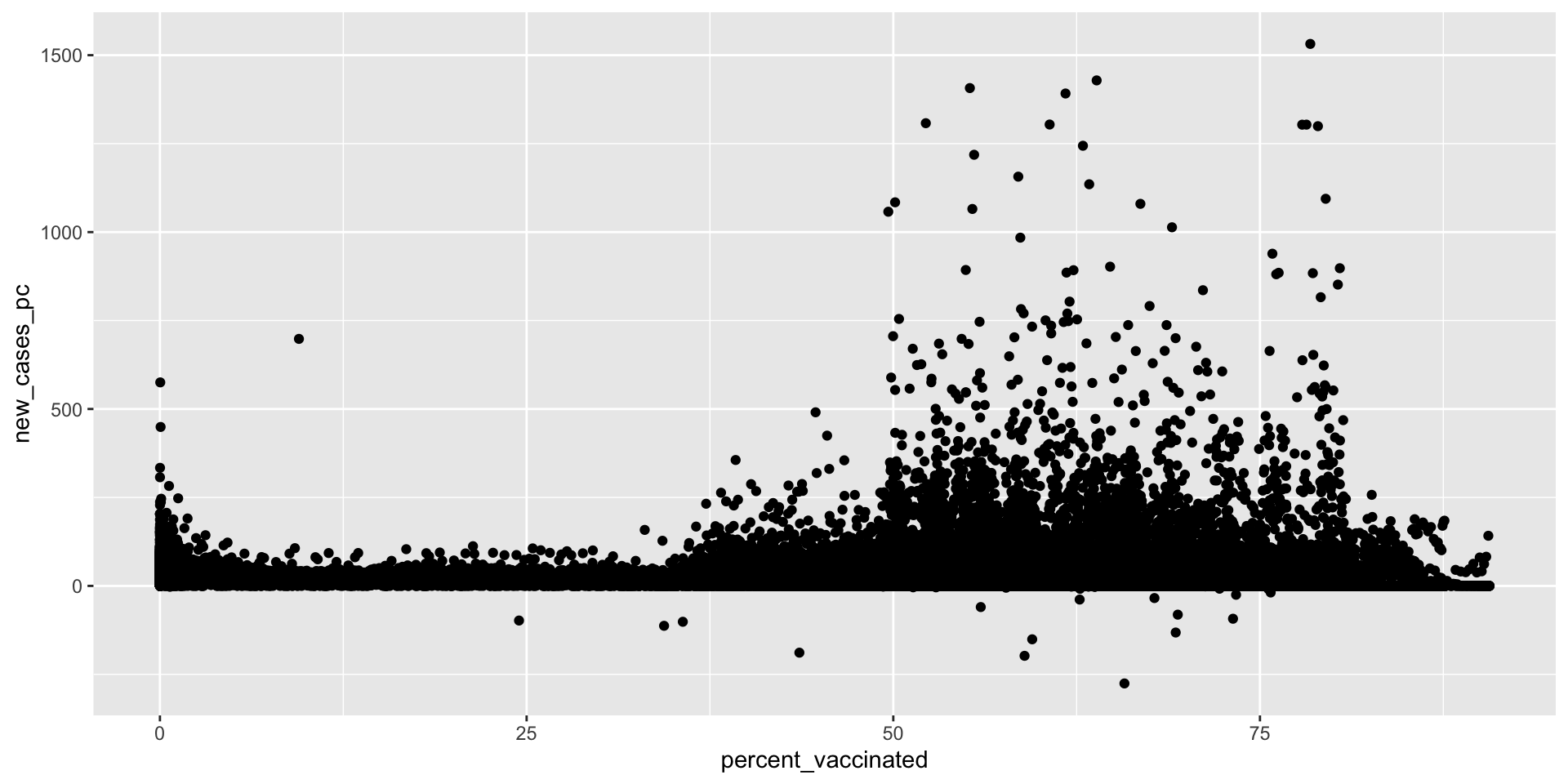
What’s the relationship between vaccination rates and new cases of Covid-19?
The grammar of graphics provides a language for translating data into figures
At a minimum figures with ggplot() require three things:
dataaesthetic mappingsgeometriesTo produce a figure:
Learning to code is hard, but the more errors you make now, the easier your life will be in the future

POLS 2580